

BCS COBOL Studio
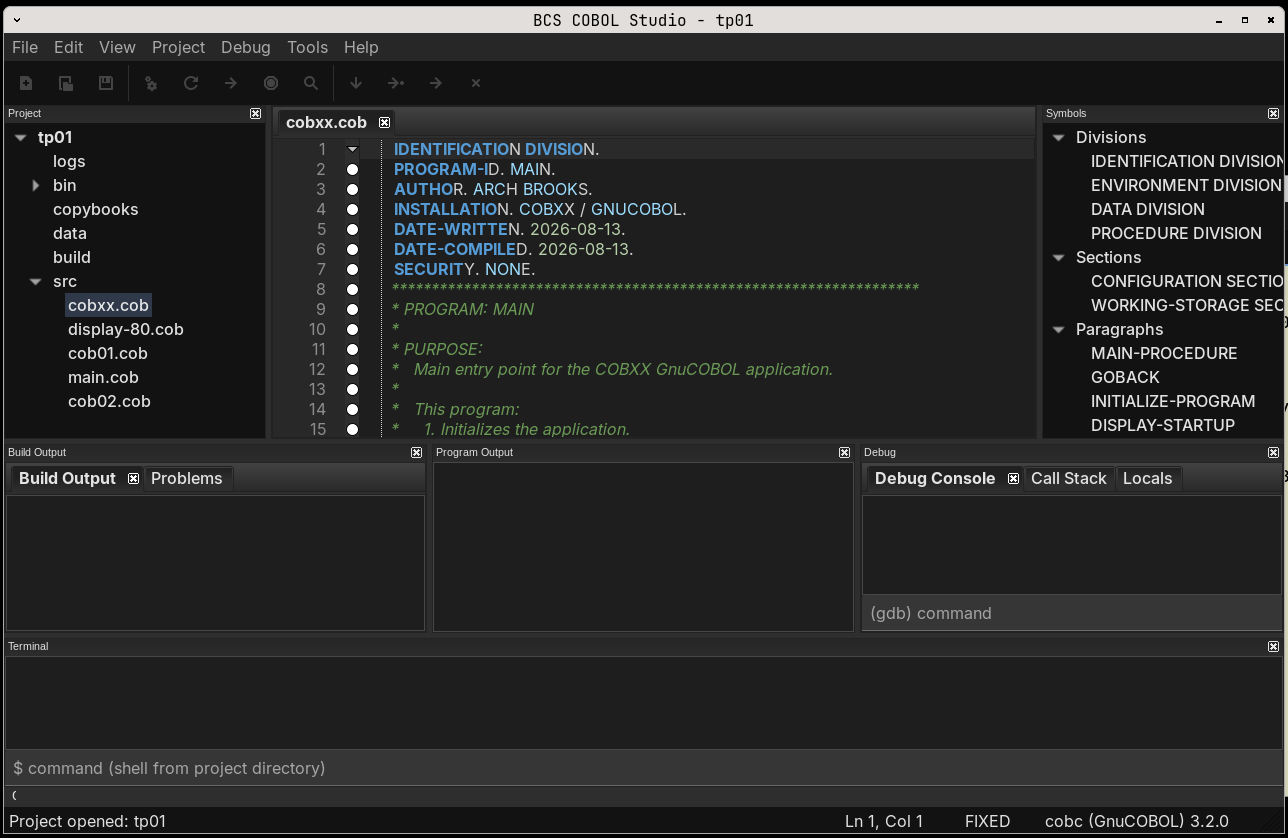
A standalone native COBOL IDE for Linux, built with C++20, wxWidgets
and the real GnuCOBOL (cobc) compiler and GNU
gdb debugger as subprocesses — no emulation, no
wrappers.
Features
- Editor — wxStyledTextCtrl-based editing with COBOL syntax highlighting, free/fixed/auto format detection, line numbers, bookmarks, find/replace, zoom, and split-aware multi-file tabs.
- Projects — JSON project files (
.gcp) with source and copybook directories, compiler/linker options, library paths, environment variables, run arguments, and a project tree panel. - Real build — Build / Rebuild / Clean invoke the
installed
cobccompiler asynchronously. Compiler output is parsed into a Problems panel with clickable file/line navigation. - Run — Build-and-Run (or run an existing executable) with stdout/stderr captured into an Output panel.
- Debug — GDB integration over the MI protocol:
start/pause/restart/ continue, step into/over/out, breakpoints (synced
to the editor gutter,
Ctrl+B), call-stack and variable panels, plus a raw GDB console — all running inside the IDE. - ISPF-inspired shell — a Command
===>field (SAVE,BUILD,REBUILD,CLEAN,RUN,DEBUG,STOP,FIND,LOCATE,LIST,NEW,EXIT,HELP, …) and configurable PF keys. - Themes — light, dark and system themes.
- Extras — copybook lookup (
COPYresolution), symbols/outline panel, search in project, source printing, integrated terminal, recent-projects list, and new-project templates.
Requirements
| Tool | Notes |
|---|---|
| GCC / Clang | C++20 |
| CMake | >= 3.16 |
| wxWidgets | >= 3.2, built with aui and stc
libraries |
| GnuCOBOL | cobc (e.g. dev-lang/gnucobol) |
| GDB | any recent version (MI interpreter) |
On Gentoo:
emerge dev-lang/gnucobol sys-devel/gdb x11-libs/wxGTKBuild
cmake -S . -B build -DCMAKE_BUILD_TYPE=Release
cmake --build build -j$(nproc)
Run
./build/bcs-cobol-studioOptionally open a project or source file directly:
./build/bcs-cobol-studio examples/copybook-example/copybook-example.gcpTests
ctest --test-dir build --output-on-failureThe test suite covers the JSON project format, compiler-output parsing, build-command construction, and the CobolParser module.
Example project
examples/copybook-example/ is a small, fully working
project:
examples/copybook-example/
├── copybook-example.gcp   # project file (JSON)
├── main.cob               # COBOL program that COPYs the record layout
├── copybooks/
│   └── employee-rec.cpy   # copybook (included, never compiled directly)
└── employees.dat          # data file read by the program
Open it, press F6 (Build and Run), and it compiles
with cobc and prints the employee records from
employees.dat.
Keyboard shortcuts
| Shortcut | Action |
|---|---|
Ctrl+Shift+N |
New project |
Ctrl+Shift+O |
Open project |
Ctrl+N |
New file |
Ctrl+O |
Open file |
Ctrl+S |
Save |
Ctrl+Shift+S |
Save As |
Ctrl+Alt+S |
Save all |
Ctrl+W |
Close tab |
Ctrl+P |
|
Ctrl+F / Ctrl+H |
Find / Replace |
Ctrl+G |
Go to line |
Ctrl+Shift+F |
Search in project |
Ctrl+F2 / F2 / Shift+F2 |
Toggle / next / previous bookmark |
Alt+1 … Alt+6 |
Toggle project / symbols / build / output / debug / terminal panels |
F5 |
Build |
Ctrl+F5 |
Rebuild |
F6 |
Build and Run |
Shift+F6 |
Run |
Shift+F7 |
Stop |
F7 |
Build and Debug |
F9 |
Start / Continue debugging |
Shift+F9 |
Stop debugging |
Ctrl+Shift+F9 |
Restart debugging |
F10 |
Step Into |
F11 |
Step Over |
Shift+F11 |
Step Out |
Ctrl+B |
Toggle breakpoint |
Ctrl+, |
Settings |
Ctrl+Q |
Exit |
ISPF command field
SAVE, COMPILE, BUILD,
REBUILD, CLEAN, RUN,
DEBUG, STOP, FIND <text>,
LOCATE <line|symbol>, LIST,
LIST SYMBOLS, NEW,
EXIT/QUIT, HELP.
LIST without arguments lists the project's source files;
LIST SYMBOLS lists the symbols of the current file.
Default PF keys: F3 Close, F4 Exit,
F5 Build, F6 Run,
F7/F8 scroll, F9 Continue,
F10/F11 prev/next tab. All configurable under
Tools > Settings.
Project file format
.gcp files are plain JSON:
{
    "name": "copybook-example",
    "executable": "employee-report",
    "format": "free",
    "compiler": "/usr/bin/cobc",
    "source_directories": ["."],
    "copybook_directories": ["copybooks"],
    "library_directories": [],
    "libraries": [],
    "debug_info": true,
    "warnings": true,
    "module": false,
    "compiler_options": "",
    "linker_options": "",
    "run_arguments": "",
    "run_working_directory": "",
    "environment": []
}source_directories— scanned recursively for.cob,.cbl,.cobolsources to compile.copybook_directories— searched forCOPY-referenced copybooks; never compiled directly.compiler— optional; when empty the compiler discovered on PATH is used.
Source layout
src/
├── main.cpp                 # entry point (wxIMPLEMENT_APP)
├── app/                     # Application, ProcessRunner, Json
├── ui/                      # MainFrame, MainMenu, ToolBar, dialogs
├── editor/                  # CobolEditor (STC) + CobolLexer
├── project/                 # Project (.gcp) + ProjectManager
├── compiler/                # cobc discovery, command build, output parsing
├── debugger/                # GDB/MI session handling + breakpoints
├── terminal/                # integrated shell subprocess
├── parser/                  # COBOL symbol/outline parser
├── settings/                # persisted settings (config)
└── filesystem/              # FileManager helpers
templates/                   # new-project starter programs
examples/copybook-example/   # runnable example project
resources/                   # icons and desktop file
tests/                       # unit tests (ctest)
Installation
cmake --install build --prefix /usr/localInstalls the binary, a .desktop file, hicolor icons,
templates and the example project.
Notes
- Compiler, copybook and gdb discovery are done against the real installed tools; nothing is simulated.
- Dark theme uses GTK hints when built with GTK3 support.